
Best Budget Laptops for Students and Online Classes in India
A student laptop needs four things and a good webcam is not one of them. What to prioritise on a real budget.
Most student laptop guides are written by people who have not sat through a four-hour online class on a machine that gets hot near the trackpad.
Let me start with what actually matters, because it is not what the spec sheets emphasise.
The four things that matter
Keyboard. You are going to type more than you expect. Assignments, notes, lab reports, endless forms. A bad keyboard makes all of it worse and you cannot upgrade it.
Battery, sort of. Enough to get through a class without hunting for a socket. Not enough to matter for a full day, because you will be near a plug more often than the marketing suggests.
Weight. You are carrying this in a bag every day for years. Anything over about 1.8kg becomes a decision you regret every morning.
Enough processor to not stutter in a video call with slides open. That is a lower bar than people think. It is also a bar that cheap new laptops routinely fail.
Notice what is not on that list. Screen resolution. Dedicated graphics. A great webcam.
About the webcam
Every one of these machines has a 720p webcam that looks mediocre. So does almost every laptop at any price under sixty thousand rupees.
Nobody in your class cares. Everybody's camera looks like that. If you genuinely need to look sharp for viva or interviews, a clip-on USB webcam costs around a thousand rupees and beats every built-in camera in this price range. Solve it with fifteen hundred rupees, not by paying five thousand more for a laptop.
That is the single best value tip in this entire post and it took me two years of watching people overspend to work out.
What to actually buy
For most students, on most budgets, the sweet spot is a refurbished ex-corporate 14-inch business laptop with an 8th-gen i5, 8GB of RAM, and an SSD. Around ₹19,000 to ₹20,000.
The Dell Latitude 5400 at ₹19,550 fits exactly, and it is what I would put in a younger sibling's bag. Quad-core, so it does not choke when Zoom and Chrome and a PDF are all open. Matte screen, which matters more than you would guess when you are working under a tube light or near a window. Built to survive a hostel.
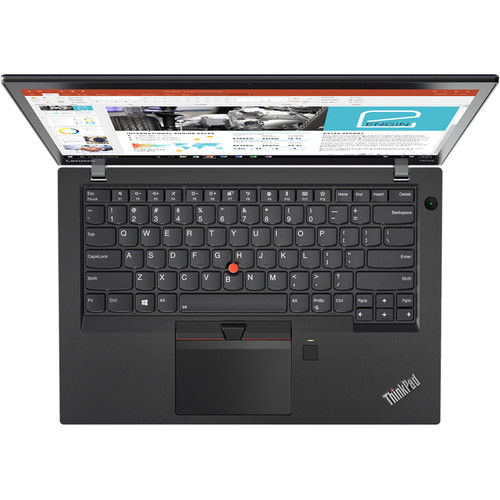
If the budget is tighter, the ThinkPad T470 at ₹16,500 has that famous keyboard and will handle classes without complaint. It is a slower chip. For note-taking and lectures you will not notice.
If money is genuinely tight at fifteen thousand, the Dell Latitude 7450 works. Just know you are buying a shorter runway.
Why not a new laptop at the same price
Because a new ₹20,000 laptop in India is a Celeron with 4GB of RAM, and 4GB is not enough for a browser with a lecture, a PDF, and WhatsApp Web open at the same time. It will swap to disk and crawl.
You are choosing between a five-year-old machine that was excellent when new, and a brand-new machine that was cheap when new. For studying, the old excellent one wins every time.
The stuff that trips students up
Do not buy a machine with a mechanical hard drive. Some very cheap listings still have them. An SSD is the single biggest difference in how fast a laptop feels. All of ours have one.
Check whether the RAM is upgradable before you buy. On these business machines it usually is. Two thousand rupees and ten minutes gets you to 16GB in second year when your projects get heavier.
Get the warranty in writing. A student laptop takes abuse. Ours is a year, with an onsite engineer for serviceable locations, and a return window of 14 days if something is wrong out of the box.
Buy the sleeve. Not from us, from anywhere. Two hundred rupees of foam has saved more laptops than any warranty.
One last thing
Buy for the work you actually do, not the work you imagine doing.
Almost every student who tells me they need a powerful laptop for video editing edits one video, in the first month, and then uses the machine for lectures and assignments for the next four years. Buy the machine that is excellent at the boring thing you do daily.
Spend what is left on a mouse, a stand, and a second-hand monitor. Your neck will thank you around exam season.
Questions? +91-8971319555, or support@lapshark.com. Tell us the course and the budget.